
STAT 200 UGMC Answers & Help
We Can Handle Your Stats Work!
UMGC STAT 200 Help: Introduction to Statistics
STAT 200 at University of Maryland Global Campus is an 8-week compressed statistics course that consistently ranks among UMGC’s most challenging requirements. Our statisticians help with Excel assignments, hypothesis testing, the proctored final, and every component in between—backed by our A/B grade guarantee.
Course at a Glance
STAT 200: Introduction to Statistics is a 3-credit undergraduate course serving as the statistics requirement for most UMGC business, psychology, and social science programs. The course emphasizes practical application and data interpretation using Microsoft Excel rather than mathematical theory.
8 weeks (compressed)
Microsoft Excel + Data Analysis ToolPak
LEO (Canvas-based LMS)
Proctored (25-30% of grade)
What Is UMGC?
University of Maryland Global Campus is a public university specifically designed for working adults, military service members, and students who need flexible online degree programs. Unlike traditional universities serving recent high school graduates, UMGC’s student body averages 30+ years old, with most students working full-time while pursuing degrees. The university has over 90,000 students worldwide and specializes in online education with a focus on accessibility and career-oriented programs.
UMGC evolved from University of Maryland University College (UMUC), founded in 1947 to serve military personnel overseas. This military heritage continues today—roughly 50% of UMGC students have military connections, either active duty, veterans, or military family members. The university offers classes on military bases worldwide, at numerous Maryland locations, and primarily through online courses accessible anywhere. UMGC is regionally accredited and part of the University System of Maryland, giving degrees the same credibility as traditional Maryland public universities.
The online-first approach creates both advantages and challenges. Advantages include genuine flexibility—no set class times, asynchronous work, and the ability to complete coursework around demanding schedules. Challenges include less direct professor interaction, reliance on self-motivation, and technical requirements for all courses. UMGC uses 8-week terms rather than traditional semesters, meaning courses move at double speed. What traditional universities teach in 16 weeks, UMGC compresses into 8 weeks.
Week-by-Week Course Structure
Understanding what’s coming helps you stay ahead. STAT 200 packs a full semester of statistics into 8 weeks, with each week introducing substantial new material that builds on the previous week:
Descriptive Statistics & Data Visualization
Calculating mean, median, mode, range, variance, and standard deviation in Excel. Creating histograms and bar charts. Week 2 introduces the Data Analysis ToolPak, which you’ll use throughout the course for more complex operations.
Probability & Probability Distributions
Probability rules (addition, multiplication, conditional), binomial experiments, and the normal distribution. You’ll use BINOM.DIST for discrete probabilities and learn z-scores for continuous distributions. First major project typically due in this window.
Confidence Intervals & Hypothesis Testing
This is the conceptual heart of the course—and where most students struggle. Constructing confidence intervals, understanding margin of error, setting up null and alternative hypotheses, calculating p-values, and making statistical decisions. Second major project due.
Regression, Correlation & Proctored Final
Correlation coefficients, linear regression, interpreting R², and making predictions. Week 8 brings the final project, cumulative exam prep, and the proctored final—all converging in the same week.
Why STAT 200 Is So Difficult
STAT 200’s reputation as one of UMGC’s toughest courses isn’t undeserved. Multiple factors combine to create challenges that catch students off guard even when they’ve performed well in other UMGC courses.
The most significant difficulty factor is pacing. Traditional statistics courses span 16 weeks with classes meeting 2-3 times weekly. UMGC compresses the same material into 8 weeks with no in-person meetings. You’re learning and applying new concepts twice as fast. Where a traditional course might spend two weeks on hypothesis testing, UMGC covers it in one week. If you miss a week or fall behind, catching up becomes extremely difficult because new material keeps arriving before you’ve mastered previous concepts.
⏱️ Compressed Timeline
16 weeks of content in 8 weeks. Students consistently report spending 15-20 hours per week—not the advertised 9-12. The pace is relentless with no catch-up weeks.
📊 Excel Without Training
The course assumes you know Excel. You’re expected to use AVERAGE, STDEV, T.TEST, Data Analysis ToolPak, and create charts—but the course doesn’t teach Excel basics.
🧠 Conceptual Depth
Statistics isn’t procedural like algebra. You can’t just memorize formulas. You need to understand when to use which test, how to interpret results, and why approaches are valid.
👔 Working Adult Reality
UMGC students work 40+ hours weekly, manage families, and handle adult responsibilities. Finding 15-20 hours for coursework while working full-time is genuinely difficult.
The asynchronous format also limits immediate help. When you’re stuck on a statistics problem at 11 PM, you can’t raise your hand and ask the professor. You can email or post in discussion forums, but responses take hours or days. By the time you get help, you’ve either figured it out yourself, moved on, or fallen behind.
Understanding the Normal Distribution
The normal distribution is the foundation for everything in Weeks 4-8. Confidence intervals, hypothesis testing, and regression all assume your data follows (or approximates) this bell-shaped curve. Even when raw data isn’t normally distributed, sampling distributions of means tend toward normality thanks to the Central Limit Theorem—which is why these methods work broadly.
Normal Distribution Curve with Standard Deviations
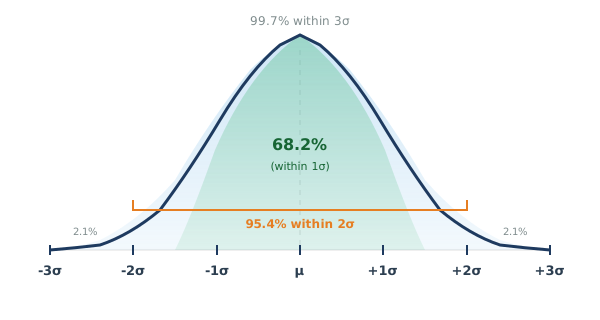
The empirical rule: 68% of data falls within 1 standard deviation of the mean, 95% within 2, and 99.7% within 3.
The empirical rule (68-95-99.7) isn’t just a fact to memorize—it’s how you develop intuition for what’s unusual. If a data point is more than 2 standard deviations from the mean, it’s in the outer 5%. More than 3 standard deviations? You’re looking at something that happens less than 0.3% of the time by chance alone. This intuition directly feeds into hypothesis testing: when your test statistic lands in those extreme tails, you have evidence that something other than chance is at work.
In Excel, you’ll use NORM.DIST to find the probability of a value occurring and NORM.S.INV to work backwards from a probability to find the corresponding z-score. The “S” in NORM.S.INV stands for “standard”—meaning a normal distribution with mean 0 and standard deviation 1.
Hypothesis Testing: The Core Concept
Hypothesis testing is where STAT 200 students struggle most, and it’s worth spending extra time here because it’s also the most practically useful skill from the course. In business settings, you’ll constantly face questions like: “Did this marketing campaign actually increase sales, or was it just random variation?” Hypothesis testing provides a framework for answering these questions rigorously.
The process works like this: you start by assuming nothing special is happening (the null hypothesis, H₀). Then you collect data and calculate how likely you’d be to see results this extreme if the null hypothesis were true. If that probability (the p-value) is very low, you reject the null hypothesis and conclude something real is happening.
Hypothesis Testing: Rejection Regions

Choose left-tailed when testing “less than,” right-tailed for “greater than,” and two-tailed for “not equal to.”
The direction of your test depends entirely on your research question. Words like “greater than,” “more than,” “increased,” or “improved” suggest one-tailed tests. Words like “different,” “changed,” or “not equal to” suggest two-tailed tests. Getting this wrong doesn’t just affect your answer—it affects whether your conclusion is statistically valid.
Common Interpretation Mistake
The decision rule is simple: if p-value ≤ alpha, reject H₀. If p-value > alpha, fail to reject H₀. But “fail to reject” does NOT mean “accept.” It means your data doesn’t provide strong enough evidence. There could still be a real effect—you might just need a larger sample size to detect it.
Confidence Intervals Explained
Where hypothesis testing gives you a yes/no answer (is there a significant effect?), confidence intervals give you a range of plausible values. When your STAT 200 assignment asks for a “95% confidence interval for the mean,” you’re finding the range where you’re 95% confident the true population mean falls.
Anatomy of a Confidence Interval
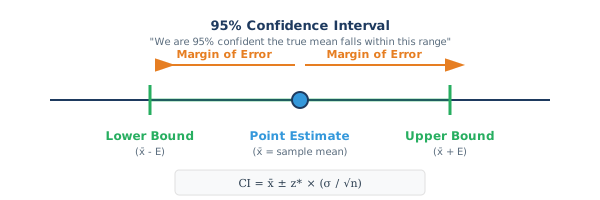
The margin of error depends on your confidence level, sample size, and standard deviation. Larger samples = narrower intervals.
The correct interpretation of a 95% confidence interval is subtle but important: “If we repeated this sampling process many times, about 95% of the intervals we construct would contain the true population parameter.” It’s a statement about the method’s long-run reliability, not about any single interval.
The incorrect interpretation—one that loses points on exams—is saying “there’s a 95% probability the true mean is in this interval.” Once you’ve calculated the interval, the true mean either is or isn’t in it; probability doesn’t apply to a fixed but unknown value.
What Students Say on Reddit About STAT 200
The Reddit community r/UMGC provides unfiltered student perspectives on STAT 200. Reading through these discussions reveals consistent themes and challenges.
One recurring theme is students drastically underestimating time requirements. One user wrote: “STAT 200 says 9-12 hours per week but I’m easily spending 20+ hours and still barely keeping up. I work full-time and this is my only class this term. How are people doing this with multiple classes?” Another echoed: “I thought statistics would be easier than calculus. WRONG. I’m spending more time on STAT 200 than I did on any other UMGC course combined.”
Excel technical difficulties dominate Reddit discussions. One student posted: “I understand the statistics but I’m losing points because Excel. I spent 3 hours trying to figure out why my regression output didn’t match the example. Turns out I had a single cell highlighted wrong. THREE HOURS.” Another vented: “The course doesn’t teach Excel, it just expects you to know it. I’ve never used Data Analysis ToolPak before and there’s no tutorial.”
The proctored final generates substantial anxiety. One post: “I’ve maintained an A all semester but I’m terrified of the proctored final. All my homework I could take my time and Google things when stuck. Now I have to do everything from memory in 2 hours?” Students discuss the disconnect between homework and exams—homework allows unlimited time and resources, while proctored exams test what you truly understand independently.
Reddit Consensus: Get Help Early
Multiple threads discuss when to seek help. The consensus: if you’re struggling by week 2, get help immediately. Don’t wait until week 5 or 6 when you’re too far behind to recover. One user: “I tried to power through on my own and by week 4 I was drowning. Wish I’d gotten help sooner instead of wasting weeks struggling.”
📊 Essential Excel Formulas for STAT 200
UMGC’s STAT 200 runs entirely in Excel. These are the formulas you’ll use repeatedly:
Binomial probability. FALSE = exactly x successes. TRUE = at most x successes.
Returns z-score for a given probability. For 95% CI, use =NORM.S.INV(0.975) to get 1.96.
Compares two sample means, returns p-value directly. Type: 1=paired, 2=equal var, 3=unequal.
Calculates margin of error. For 95% confidence, alpha = 0.05.
Correlation coefficient. Ranges from -1 (perfect negative) to +1 (perfect positive).
Sample standard deviation. Use .S for samples (almost always), .P only for entire populations.
Pro tip: Enable the Data Analysis ToolPak before Week 2: File → Options → Add-ins → Go → Check “Analysis ToolPak” → OK. You’ll need it for regression and descriptive statistics.
Study Strategies for STAT 200 Success
Success in STAT 200 requires strategic approach beyond just completing assignments. These specific strategies help UMGC students manage the course’s unique challenges.
Master Excel Before Week 1. Don’t wait for the course to teach Excel—it won’t. Spend time before the term starts learning Excel basics: entering data and using functions (SUM, AVERAGE, STDEV), creating charts, using the Data Analysis ToolPak, and understanding absolute versus relative cell references. YouTube offers excellent Excel tutorials. Investing 3-4 hours learning Excel before STAT 200 starts prevents hours of frustration during the course.
Create a Rigid Weekly Schedule. The asynchronous format requires self-discipline. Block specific times for STAT 200 work and treat them as unmovable commitments. Plan for 15-20 hours weekly, not the advertised 9-12. Break this into daily chunks rather than weekend marathons. Having scheduled times creates structure that asynchronous courses lack.
Start Weekly Assignments on Monday. Don’t wait until Thursday or Friday to start the week’s work. New material posts Monday morning—begin reading and watching videos immediately. Starting early provides time to get stuck, seek help, and wait for responses. Students who start Friday afternoon and hit problems Saturday have no help available over the weekend.
Prepare Differently for the Proctored Final. Homework and the final exam test different things. Homework tests whether you can find answers with time and resources. The final tests what you genuinely understand and can do independently. Prepare by taking practice exams under timed conditions with no resources available, memorizing key formulas, and practicing calculations by hand since Excel won’t be available.
Common Mistakes to Avoid
Recognizing common pitfalls helps you avoid them. These mistakes appear repeatedly in STAT 200:
Taking STAT 200 With Multiple Other Courses. STAT 200’s workload demands treating it as potentially your only course. Students who take it alongside 2-3 other classes often struggle. The 8-week compressed term means all courses move fast simultaneously. Consider taking STAT 200 alone or with just one easier course.
Relying Too Heavily on Outside Resources for Homework. Using Google or Chegg for homework help is tempting. The problem: you might get correct answers without understanding how or why. This works until the proctored final where you must work independently. Students who heavily relied on outside help often panic during exams realizing they don’t actually know the material.
Memorizing Without Understanding. Statistics requires conceptual understanding, not just formula memorization. You can memorize the confidence interval formula but if you don’t understand what confidence intervals represent, you’ll struggle with interpretation questions. Focus on why formulas work and what results mean, not just on computation.
Not Testing Technical Setup Before the Proctored Exam. Proctoring software requires specific technical configurations. Don’t wait until exam day to discover your webcam doesn’t work or the software won’t run. Test everything at least a week before the exam. Have a backup location if your home internet is unreliable.
Navigating UMGC’s LEO Platform
UMGC uses LEO (Learning Experience Online), a customized Canvas-based learning management system. Understanding LEO’s interface and quirks helps you work more efficiently.
LEO organizes STAT 200 into weekly modules. Each week contains overview pages, learning objectives, required readings, video lectures, assignments, quizzes, and discussion prompts. The left navigation menu provides access to different course sections: Modules (weekly content), Assignments (all homework and projects), Discussions (forum posts), Grades (your scores), and Syllabus (course policies). Familiarize yourself with this structure in Week 1 so you don’t waste time hunting for materials.
LEO has specific file upload requirements. Excel files must typically be .xlsx format (not .xls). Word documents should be .docx. Some assignments require specific file naming conventions. Read instructions carefully before submitting to avoid issues. Once submitted, you can often resubmit before the deadline if you catch errors.
Discussion posts typically require an initial post by mid-week (often Wednesday or Thursday) and replies to two classmates by the weekly deadline (often Sunday). Initial posts must meet minimum word counts and demonstrate thought. Reply posts should engage substantively with classmates’ ideas, not just “I agree.” Poor discussion participation loses easy points—treat it seriously.
UMGC STAT 200 vs Other Schools
How does UMGC’s STAT 200 compare to introductory statistics at other institutions? Understanding differences helps set realistic expectations.
| Aspect | UMGC STAT 200 | Traditional University |
|---|---|---|
| Term Length | 8 weeks (compressed) | 16 weeks (full semester) |
| Format | Fully asynchronous online | In-person or synchronous online |
| Instructor Interaction | Delayed (email, forums) | Immediate (live Q&A) |
| Typical Student | 30+ years, working full-time | 18-22 years, full-time student |
| Weekly Time Commitment | 15-20 hours (realistic) | 9-12 hours (normal pace) |
| Software | Microsoft Excel | Varies (Excel, SPSS, R, Minitab) |
| Exam Proctoring | Strictly enforced online proctoring | In-person or varies |
The content and rigor are comparable to traditional universities’ introductory statistics courses. The topics, concepts, and depth match what you’d find elsewhere. The challenge isn’t that UMGC makes statistics harder—it’s that the delivery format (compressed, asynchronous, serving working adults) creates difficulty separate from content itself. The statistics is the same; the circumstances make it harder.
How We Help With STAT 200
Professional Statistics Support
Professional assistance with STAT 200 isn’t about taking shortcuts—it’s about getting results when you’re genuinely overwhelmed by the course’s demands while managing work, family, and other responsibilities.
We handle all aspects of your STAT 200 course throughout the 8-week term: homework assignments with accurate solutions, discussion board posts with substantive content, weekly quizzes, Excel projects with proper analysis and interpretation, and proctored final exam preparation. We specialize in UMGC courses and understand LEO platform navigation, UMGC’s grading rubrics, and the course’s specific requirements.
Whether you need help with a single challenging week, the cumulative final project, or ongoing support through all 8 weeks, we match you with someone who knows UMGC’s format inside out.
Frequently Asked Questions
What software does UMGC STAT 200 use?
STAT 200 uses Microsoft Excel with the Data Analysis ToolPak. Some sections may use SPSS or R, but Excel is most common. The course assumes basic Excel familiarity but doesn’t explicitly teach Excel skills—you’re expected to know how to create charts, use statistical functions, and perform regression analysis.
How long is STAT 200 at UMGC?
STAT 200 is an accelerated 8-week course. This compressed timeline means you’re covering roughly two weeks of traditional semester content every week. Students consistently report needing 15-20 hours per week—significantly more than UMGC’s estimated 9-12 hours.
Why do students struggle with STAT 200?
The combination of compressed 8-week pacing, asynchronous online format with limited instructor interaction, Excel technical requirements without Excel training, and serving working adults who lack time creates unique challenges. The conceptual nature of statistics (requiring understanding, not just memorization) compounds these difficulties.
What are the hardest topics in STAT 200?
Hypothesis testing consistently ranks as the most difficult topic—it requires understanding counter-intuitive logic where you assume something true then evaluate evidence against it. Probability distributions, confidence interval interpretation, regression analysis, and the Central Limit Theorem also challenge students significantly.
Is STAT 200 proctored?
Yes, the final exam is proctored and typically worth 25-30% of your final grade. It covers all course material cumulatively and must be taken at a proctoring center or with online proctoring software. Unlike homework where you can use resources, the proctored exam tests what you genuinely understand independently.
Can you help with STAT 200 Excel assignments?
Absolutely. We handle all Excel requirements including creating properly formatted charts, using Excel statistical functions correctly, performing regression analysis with Data Analysis ToolPak, and presenting results professionally. Many students struggle more with Excel than statistics—we handle both.
Do you guarantee grades in STAT 200?
Yes, we offer an A/B guarantee—completed work will achieve A or B results or we provide refunds or make it right. Our statisticians know UMGC’s standards and consistently deliver high-quality work that meets institutional requirements.
When should I get help with STAT 200?
Earlier is always better. If you’re uncertain about handling STAT 200 alongside work and family, engage help from Week 1. This prevents falling behind and reduces stress throughout the term. If you’re already struggling by Week 2-3, get help immediately—the compressed timeline makes recovery much harder later.
What’s the difference between UMGC STAT 200 and other schools’ statistics?
The content and rigor are comparable to traditional universities. The difference is delivery format—UMGC compresses 16 weeks into 8 weeks with fully asynchronous instruction serving working adults. The statistics concepts are standard; the circumstances make it harder.
Related Resources
- Statistics Homework Help — Comprehensive support for all statistics courses and platforms
- Excel Assignment Help — Expert assistance with Excel-based coursework and data analysis
There are many reasons why students need help with their coursework. In any case, it is never too late to ask for help. So, what are you waiting for? Let’s connect!